One Shared Document or Several Small Briefs?
Shared document or role-specific show briefs: choose a format that helps each crew member find the right instruction quickly, without carrying irrelevant detail.
The common mistake with a shared document or role-specific show briefs is putting every decision into one file and expecting each person to find their part. A door supervisor looking for the late-entry policy should not have to sift through lighting notes. The choice is less about document count than about how each role needs to use the information.
What does each reader need at a glance?
Start with the moment someone will consult the brief. A front-of-house team member may be answering an audience question at the entrance; a lighting operator may be checking a cue during a technical run. If the same file forces both readers to search through material irrelevant to their task, separate views may be clearer.
A shared reference works well for material that forms the common setting for everyone: the venue address, the running order, key contacts and agreed audience access arrangements. A focused brief is more useful for instructions tied to a particular job, such as how ushers handle late arrivals or how an operator follows a cue sequence.
How should you arrange the documents?
Choose the arrangement by comparing the work people actually do, rather than by assuming that one format suits every production. Keep shared information easy to scan with clear headings and consistent names for spaces and roles. Google Docs and Microsoft Word heading styles help readers jump to relevant sections; a dated PDF can serve people who need a stable print copy.
Use separate briefs when their readers need different instructions or formats. A venue manager might carry a printed sheet, while a stage manager works from a digital document on a tablet. In either case, state the show, intended reader, issue date and status near the top, and identify where the reader can find fuller context.
Keep a single document if the team is small, responsibilities overlap and readers can locate their instructions without effort. Split it when distinct roles have to hunt through unrelated material or need different layouts. More files are not automatically more organised; they are simply more files until there is a clear reason for them.
Which questions help settle the format?
What belongs in a shared show document?
Put information there when several roles need the same wording, such as venue details, the running order or the agreed access plan. Mark unresolved items as provisional so they are not mistaken for confirmed instructions.
What should go in a role-specific brief?
Include the actions and decision points for that role, along with enough context to apply them correctly. Refer readers to the relevant shared section for common information instead of copying it all into each brief.
When should an instruction appear in both places?
Repeat it only if a reader needs to see it while using that brief, such as an urgent contact route. Make the shared reference clear and check each repeated version against it before issuing the documents.
How can you tell the format is working?
Ask a reader from each intended role to locate a typical instruction using the document as issued. If they reach it promptly and can tell whether it is current, keep the arrangement; if not, reorganise or split the material that caused confusion.
How do you keep the reader’s view clear?
Write for someone who may be standing in a corridor, wearing a headset or answering a question at the door. Put the action, the condition that applies and the next contact near the top. Background can follow; it rarely needs to obstruct the instruction.
- Check the title. If it names the show and the intended role, keep it; otherwise, revise it so readers can distinguish it from other files.
- Check the issue date and status. If both are visible, leave them in place; if either is missing, add it before sharing the document.
- Check room and entrance names. If they match the names used by the venue, retain them; if they differ, confirm the correct terms and replace inconsistent wording.
- Check unresolved instructions. If a decision is still pending, label it provisional and name who will resolve it; if it is confirmed, state the instruction plainly.
- Check links and permissions. If the intended readers can open the relevant file, keep the link; if they cannot, correct access or provide an approved alternative.
- Check printed copies. If a sheet is current and useful at the point of work, identify its issue date and keep it available; if it is outdated, remove it or mark it obsolete.
Print only what the role needs, and make the status of the copy unmistakable. A loose sheet without a date can outlive the decision it describes; paper has no instinct for retirement.
What does the choice look like in practice?
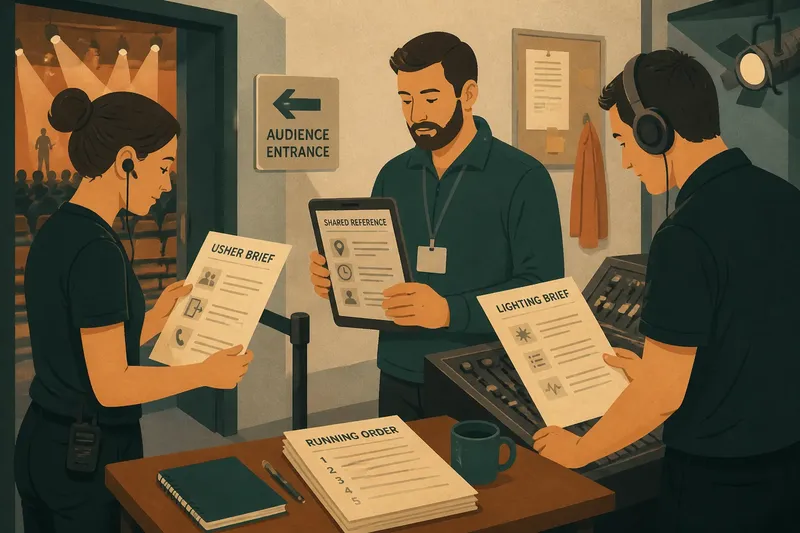
Imagine a small touring company preparing for a performance in a community hall. The starting point is one shared draft containing the venue entrance, show running order and contact details, alongside notes for ushers and lighting. The coordinator notices that the two roles need different working instructions, so keeps the common venue and running-order information together, then creates an usher brief and a lighting brief with links back to those shared sections.
Next, the hall confirms that the audience entrance is different from the one in the draft. The coordinator changes the entrance in the shared reference, updates the usher brief because its readers act on that detail, and checks whether the lighting brief mentions the entrance; if it does, that copy is corrected too. The resulting set should show one agreed entrance wherever the instruction is needed, while each role sees its own working details without unrelated notes.
When should the document arrangement change?
Early planning may suit one working file while responsibilities and arrangements are unsettled. As the production develops, separate briefs can make distinct tasks easier to use. Do not create a new file for every question: split material only when doing so makes the intended reader’s work clearer.
Before issuing a revision, check information likely to appear in more than one place: room names, access arrangements, contacts and shared instructions. If an item depends on venue policy, a performer’s agreement or local requirements, confirm it with the appropriate person before circulation.
For a shared document or role-specific show briefs, the useful test is whether readers can find and apply their instructions without wading through material meant for someone else. If they cannot, change the layout, the division of information or the number of briefs. The best arrangement is the one that lets each person identify the instruction that applies to their work.