The Backstage Checklist That Becomes Too Long
A backstage checklist works better when crews can spot their next action quickly. Group prompts, assign owners and remove items that no longer help.
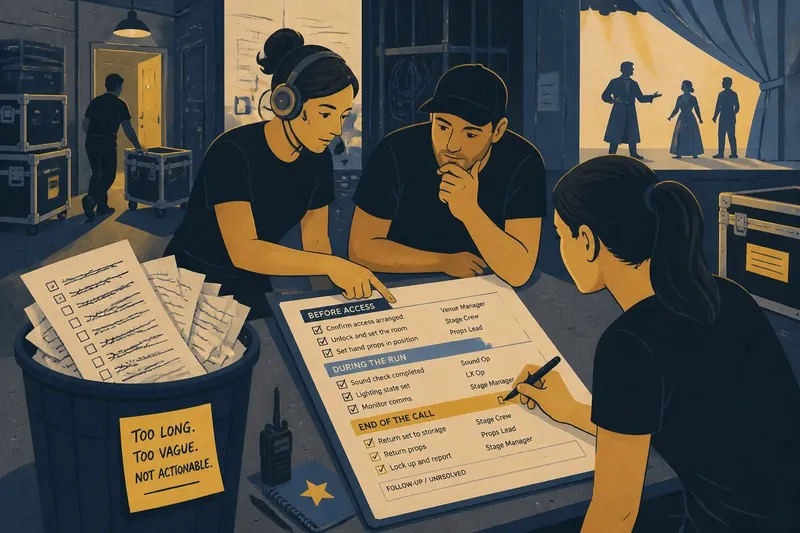
The common mistake with a backstage checklist is treating every missed detail as a reason to add another line. The list grows, and the cost is attention: crew members scan past familiar prompts and may miss the action that matters now.
A useful backstage checklist gives each person a clear action at the point they need it. Before adding a prompt, decide whether it belongs on this list at all; a checklist is a poor home for every note the production has accumulated.
Why does a backstage checklist keep growing?
Prompts from different moments and departments often end up together. A venue access note, a pre-show prop check and a reminder for a visiting company may all be useful somewhere, but together they ask a busy reader to sort the filing system while working.
After a problem, adding a line can seem like the obvious remedy. Before doing so, identify the action it requires, the role responsible and the point in the call when it applies. If those remain unclear, resolve the task with the relevant department before writing a prompt.
How should prompts be grouped?
Group actions by when the crew uses them, such as before access, during the run and at the end of the call. Use familiar production language, and keep each group focused on a single working moment. This makes the page easier to scan without asking people to interpret clever labels.
Say a small touring show starts with one sheet covering room access, prop placement, sound checks and post-show returns. The stage manager could sort those actions into three time-based groups and assign sound checks to the sound operator. The expected observable result is that each role can find its own tasks quickly; if people still scan unrelated items, revise the grouping or move those actions to a department-specific list.
How can you make each prompt actionable?
Name a role rather than a person whose availability may change. Where several people contribute, identify who confirms completion. Replace vague prompts such as “props ready” with an observable action, such as “confirm the hand props are in their marked positions”.
Make the timing and conditions clear, too. If a task applies only at one venue or under a particular performance arrangement, say so in the prompt or place it in a separate list for that situation.
A tick should mean that the action is complete, not that someone has noticed a problem. If the owner cannot complete it, the checklist should direct them to tell the stage manager or department lead and record the item as unresolved. A tidy page is not worth a hidden issue.
What should you check before adding another item?
Use these checks when someone proposes a new prompt. Each result should lead to a clear choice, rather than an invitation to add the item and think about it later.
- Action: Check whether the wording names something a role can do. If it names only a topic, such as “comms”, rewrite it as an action; if no action can be stated, leave it off the checklist.
- Timing: Check whether the prompt applies at a particular point in the call. If it does, put it in that group; if it applies only on a specific occasion, move it to a call note for that occasion.
- Owner: Check whether one role can take responsibility for completion. If so, name that role; if not, agree who confirms completion before adding the prompt.
- Condition: Check whether the task applies in every venue and performance arrangement. If it does not, state the condition or move the prompt to a separate venue or production list; if the condition is unknown, ask the relevant department.
- Existing coverage: Check whether a department routine or another production document already covers the action. If it does, remove the duplicate from the shared list; if it does not, choose the document where the responsible role will actually use it.
- Completion: Check what someone can observe to confirm the action is done. If the result is observable, write that result into the prompt; if it is not, clarify the task before adding it.
Which prompts should stay, move or be rewritten?
Review the list with the people who use it. Sort each prompt into one of three decisions:
- Keep: Retain a repeatable action that supports a real decision or prevents a known point of confusion.
- Move: Put a venue note, department procedure or one-off instruction where it belongs, rather than keeping it on the shared checklist for convenience.
- Clarify: Rewrite a prompt that lacks an owner, timing or observable completion; if the missing detail cannot be agreed, hold the item out of the active list.
For instance, imagine a company’s shared checklist contains “check access” and the venue manager confirms that the access arrangement changes only for one performance. The stage manager could move the detail to that performance’s call note, then keep a general prompt only if someone must confirm access at every venue. The resulting decision is visible: the one-off detail is no longer mixed into routine tasks, while any recurring action still has a clear home.
Should the checklist be printed or digital?
A printed sheet is easy to mark up at a workstation. A shared digital document can make revisions easier to distribute, but only if the crew knows where the active copy lives and can access it during the call. Choose the format that fits the actual handover, then make the location of the current checklist plain.
Use a checkbox for a completed action and a separate note for follow-up. Do not use one tick to mean both “done” and “not applicable”; those answers call for different decisions. When a change affects a role, tell that role directly rather than assuming a revised page will announce itself.
When should a backstage checklist be reviewed?
Review the relevant prompts when a production change affects the work, such as a venue move, a revised running order or a different crew arrangement. Check the affected actions and roles, then remove or adjust anything that no longer applies. A review can be small; the document does not need a ceremonial rewrite.
Where a prompt depends on venue rules or equipment instructions, use the relevant source and ask the appropriate person if anything is unclear. The backstage checklist works best when each line helps a role recognise an action, complete it and report a problem. Treat every new prompt as a request for attention, and give it a clear reason to stay.